What’s new in ZenSmart this month
Sammy Brent, CIO • 20 June 2026 • 4 min read
We ship on 2 week cycles. Here are four of the latest additions to the ZenSmart Workflow Automation platform. Reach out if you would like to know more.
Straight to a feature? Jump in below.

In this edition
01
Workflow Scripts
Create custom feedback as you work
02
AI Explain This
When edge cases happen – make it AI simple
03
Touchscreen Unified: QA + Pre-Ship + Ship
Unifying multiple tasks in the one stage
04
Scan stage timing
Exact stage stopwatch monitoring
05
Latest Integrations
Hoops CRM joins the list
01 – Workflow Scripts
Easy workflow customisation for brands and customers
At a Glance
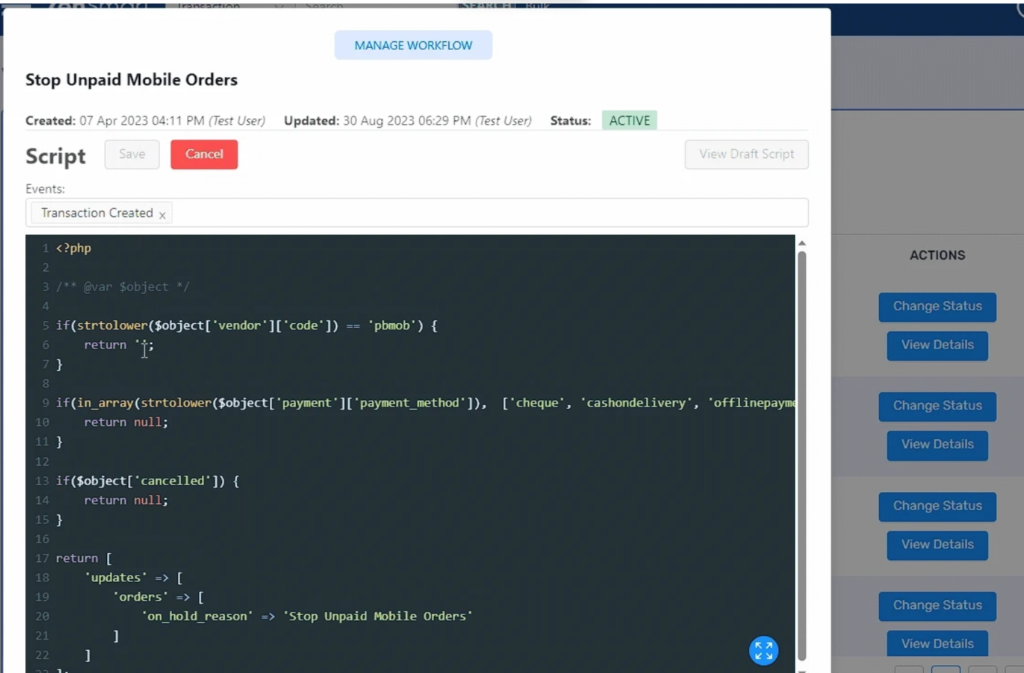
Easily define custom workflow rules without writing code.
The Problem
Customers or brands often require special business rules and conditions. That means custom business rules need to be defined, code written, tested and then deployed. It creates reliance on the IT team, complexity, delay and it is costly.
The Feature
Workflow scripts enable rules to be written (not code), to handle all those complex conditions that the sales team agrees to but which the production team rolls their eyes at. For example, where order source = Same Day Mugs and Dispatch location = US East Coast then Batch within 4 hours AND set order priority to VIP.
What it means
The flexibility to say yes more often. The ability to let the sales team negotiate custom, complex conditions and rules that beats the opposition, delights the customer yet presents calm consistency to the production team.
02 — AI explain this
Complex errors made simple
At a Glance
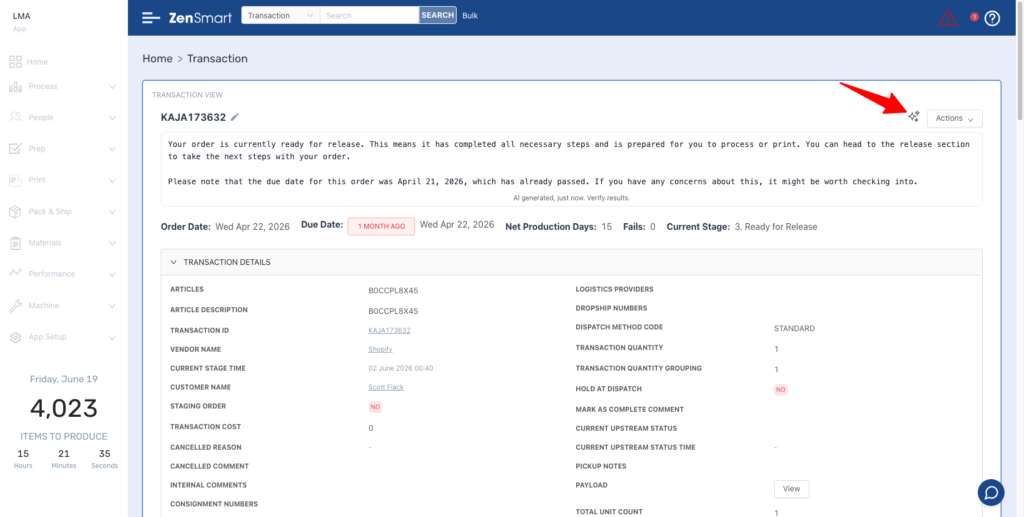
AI based explanation of errors and error codes all in plain, easy to understand language.
The Problem
It doesn’t happen often, but when the occasional order throws an error that you don’t recognise or maybe you are new to the job, things can get a little confusing and that affects productivity.
The Feature
AI explain this uses the power of AI to provide a simple, plain English (or Spanish or French or one of 42 different languages) explanation of the error that the user is encountering.
What it means
When edge cases occur or there are complex orders to process, ZenSmart supports the user to provide an explanation of any status or error messages that are encountered as they process the order.
03 — Touchscreen Unified: QA + Pre-Ship + Ship
Fast shipping performance for combined task workstations
At a Glance
Every plant is different, some separate functions out to individual stations run by specific individuals, others combine functions at a single workstation. The elegantly named unified QA, Pre-Ship and Ship (QAPS) unites the functions of assessing an order to quality, combining at Pre-Dispatch if its a Multi or Shipping if its a Single in a single highly optimised UI.
The Problem
Some factory flows need multiple functions to be combined in a single, elegant user interface. Others require functions to be separated. What is the best solution depends on time and motion and minimization of labor.
The Feature
Three often separated functions of 1) Assessing an order for quality 2) Routing to pre-shipping if an order is a Multi and 3) Shipping are combined into a single touch screen optimized interface to minimize the interaction with the screen and speed these functions.
What it means
Faster processing for sites where multiple tasks are required at the Shipping stage of production.
![zensmart is showing A web application screen shows a pop-up titled “Batch: T047DC250328000026 [Large Blankets]” with photo thumbnails, status indicators, and progress bars for scanned items, plus a sidebar menu on the left. Release Notes Edition 3, June 2026. with print workflow automation](https://zensmart.ai/wp-content/uploads/2026/06/google-docs-image-2-1-1024x495.png)
04 — Scan stage timing
Exact timing for more complex production stages
At a Glance
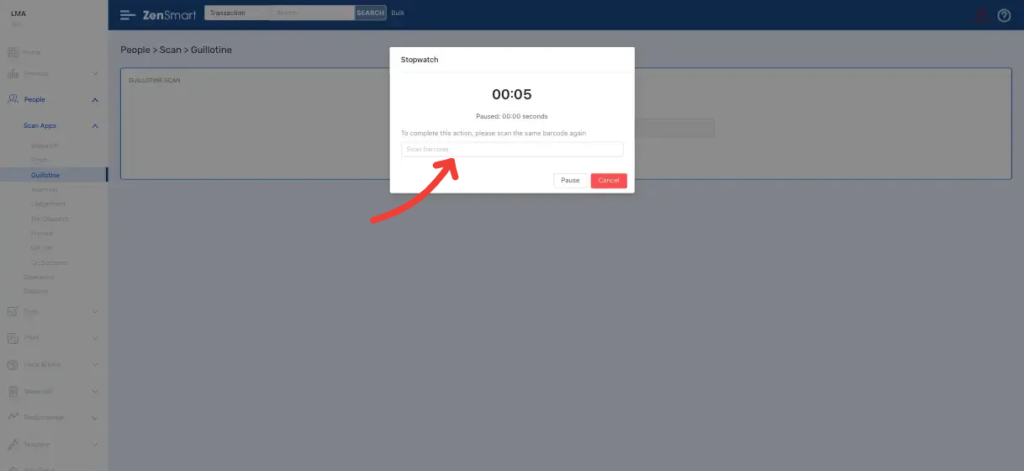
Start and stop exact timing at a single workstation stage.
The Problem
Some workflows are highly procedural and scanning on job commencement is all that’s required. Complex and highly variable tasks require a higher degree of time tracking precision – for example setting up a job on a 12 color screen printing carousel or burning a set of screens. Costs can vary significantly from job to job and precise time tracking is important for understanding job profitability.
The Feature
Start and stop time tracking as a job enters and then completes at a workstation stage.
What it means
Precise time tracking for when a process stage demands it – giving important insight into profitability of different jobs.
Introducing the ZenSmart HoopsCRM integration
Hoops has been added this month as an order source integration. Hoops is a cloud-based business management platform built specifically for screen printers, embroiderers and promotional product businesses, and is now wired directly into ZenSmart. Orders raised in HoopsCRM flow automatically into your ZenSmart instance with no manual rekeying. The integration goes beyond the order data itself. It collects the associated artwork and production files and applies metadata tagging on the way in, so each job lands in ZenSmart fully formed: ready to route, batch and produce. For shops running Hoops as their sales and order management front end, this closes the gap between taking the order and making it, removing the manual handoff that usually sits between the two.

ZenSmart active integration program. The team is adding new integrations each release cycle. If you need a platform not yet on the list, reach out.
Questions About This Release?
Reach us directly at sales@zensmart.ai, or book a conversation via the form below.