
WORKFLOW AUTOMATION
FOR DIRECT MAIL
Achieve agile web and sheet production with smart insertion and spoil management.
ZenSmart for Direct Mail: Take the next efficiency step
Direct mail is a diverse industry and becoming ever more so. The staple long run VDP letter work into DL envelopes has morphed into combination of short and long run letter plus handline pick and pack of direct mail and merchandise. But while the diversity has grown, what has remained constant is the tight deadlines and the requirement for perfection.
ZenSmart Direct Mail enables queuing of jobs with common characteristics and stitching that into elegant workflow. From pure letter to handline work, it all elegantly flows through the organization to peak of efficiency with every page tracked in workflow and every action accountable.
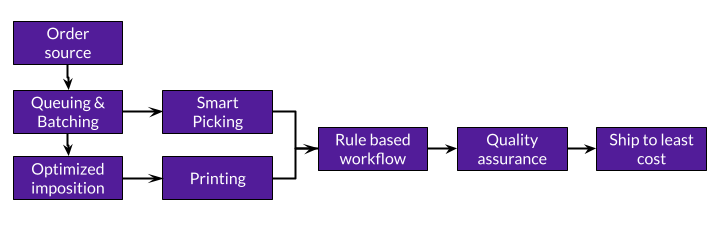
8-step automation
- VDP, ERP intake or e-com store direct connect
- Optimally queue small & long run jobs
- Auto batch to customer priority or lodge schedule
- Dynamically impose to Web Inkjet, B2 or Cut Sheet presses on the fly
- Route by job barcode, handline insert all with barcode scan/on screen instructions
- Barcode scan client barcodes to trigger automated reprint
- Page level spoil reprint in seconds
- Integrate with inhouse logistic, ship platform or use ZenSmart least cost logic
Go live in as little as 1-day with ZenSmart AI-Start
Connect to any MIS or VDP system or directly to e-com and web to print stores.
Automatically batch smaller jobs into super efficient runs
Short run direct mail can be combined with long run bill or membership jobs all automatically batched together and auto separated by job sheets.
Automated smart imposition delivers fine levels of workflow control
Use customer mailer barcodes mapped to ZenSmart unique PageIDs to provide auto scan to fail and auto reprint of spoils. All done within seconds.
Easily define workflows for standard letter work or complex handline insertion jobs
Run integrated letter insertion and handline order pack as smart rule based workflow.
Automated data protection of PII through obfuscation
Obfuscation of PII data comes out of the box to your rules, keeping you protected with best practice customer data security.
Achieve perfect WIP visibility. Never exceed a lodgment deadline
Monitor your jobs to how long they are dwelling at each workflow stages to make sure you hit lodgment deadlines.
ZenSmart Direct Mail The Process
Direct mail Industry specific features and functions created to power your business forward.
Batch optimally, automatically manage spoils, integrate letter and handline print and monitor lodgments with absolute precision.
1
ZenSmart pulls orders from your MIS / VDP system and even Shopify, Amazon, Etsy, e-commerce platforms. Directly plug in your customer stores.
Features
- ZenSmart AI-Start connects to your MIS or other order source and automatically imports, synchronizes and connects products to how you manufacture
- From XMPie to e-commerce stores or web to print platforms – all can be harmonized into a single production stream
- Letters not sized to standard and automatically standardized
- Automated retry of order retrieval
Which means
- Cut job processing costs
- Automate every job into your queues with no involvement
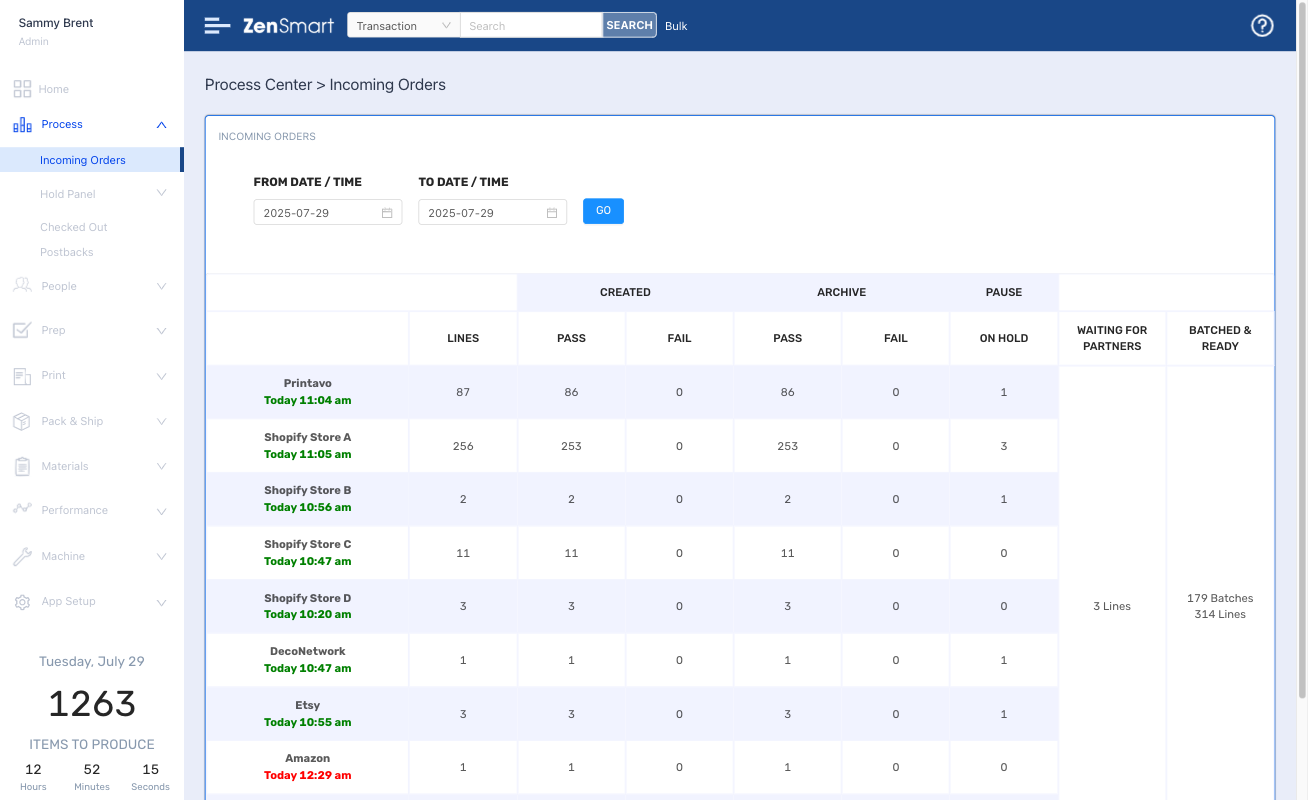

All direct mail and pick & pack work is perfectly queued ready for optimized production.
2
Features
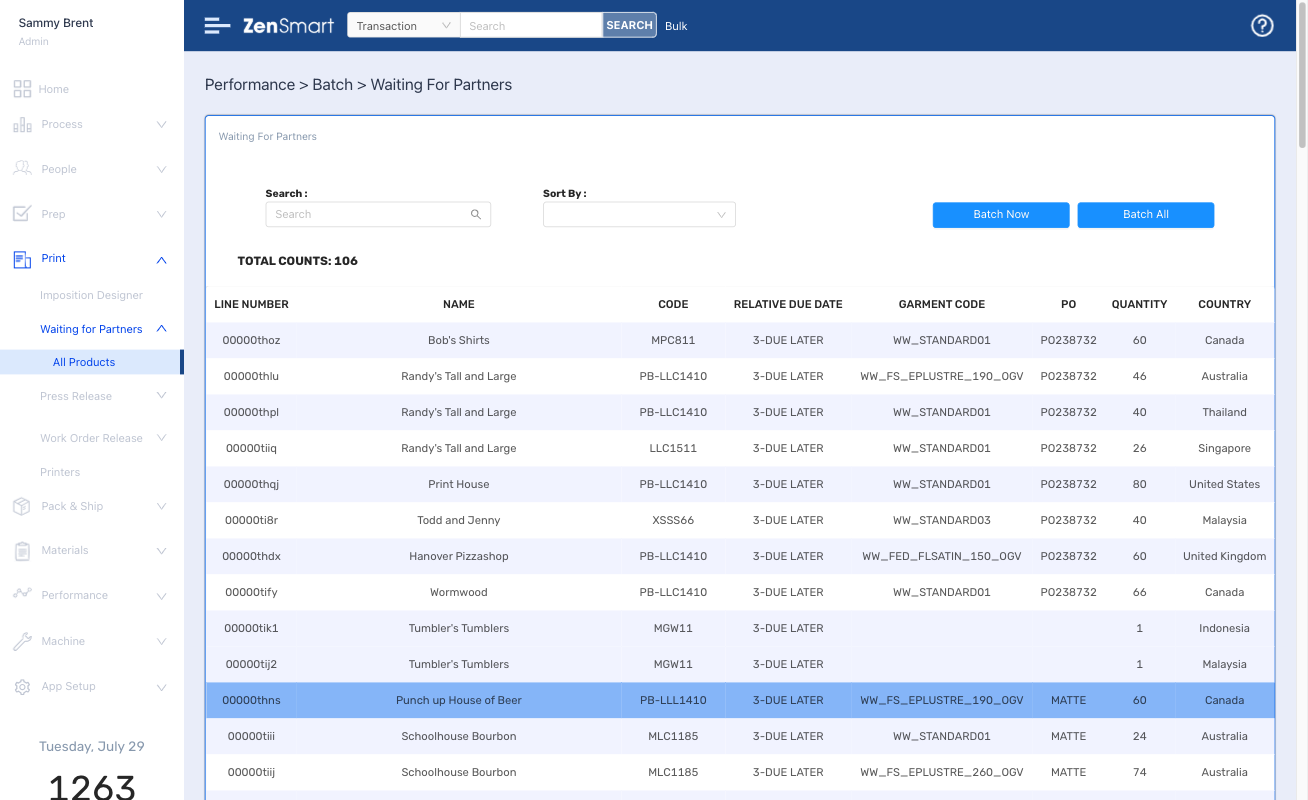
- Automated queuing by job characteristics or other job meta data – paper code, finishing options
- Add additional queue rules such as logistics provider or geography or lodgment deadline
- They are your queues and you can change the rules at any time
- Apply different queue rules on different days or time of year
Which means
- Don’t send to press per job, group your work to optimize press performance
- Get better press yield and minimize capital cost
3
Your queues automatically close to your batch rules. Your batches become both smart and right sized to due date.
Features
- Batches are created automatically. When letter count or time or some combination is reached your batch will form
- Batches can be limited by page count but separated out into smaller logical sub batches.
- Batch just in time mixing web fed inkjet jobs on HP PageWide, Canon Prostream or equivalent with cut sheet work on any press type
Which means
- Swap work between press type (controlled by substrate/job rules) with a single click
- Prevent wrong workflows being selected
- Cut labor costs
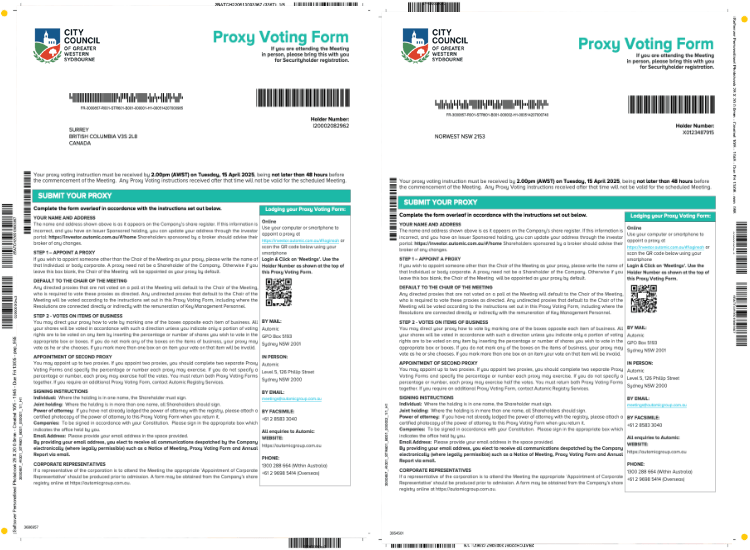
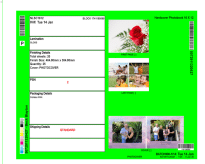
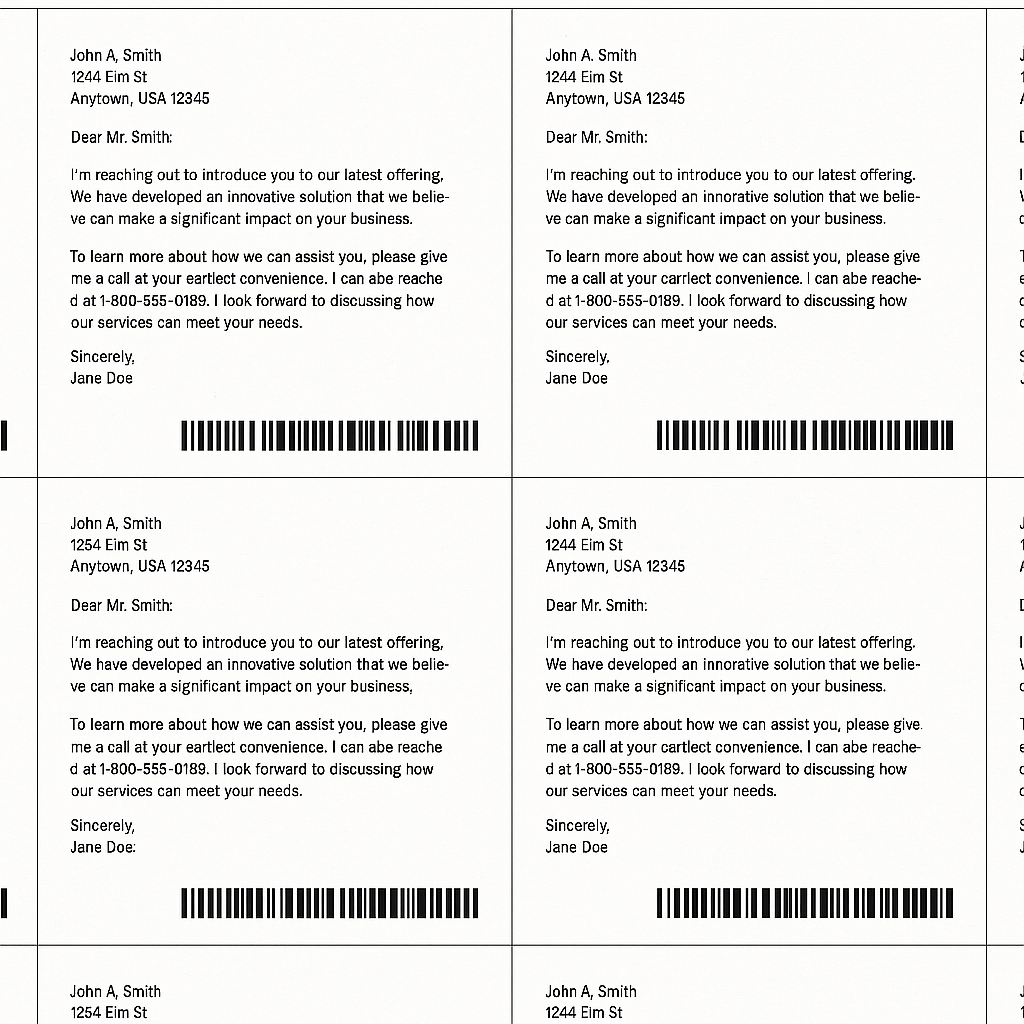
Batches are imposed just-in-time. Impose for any press and finishing workflow. Swap from web to sheet with total freedom.
4
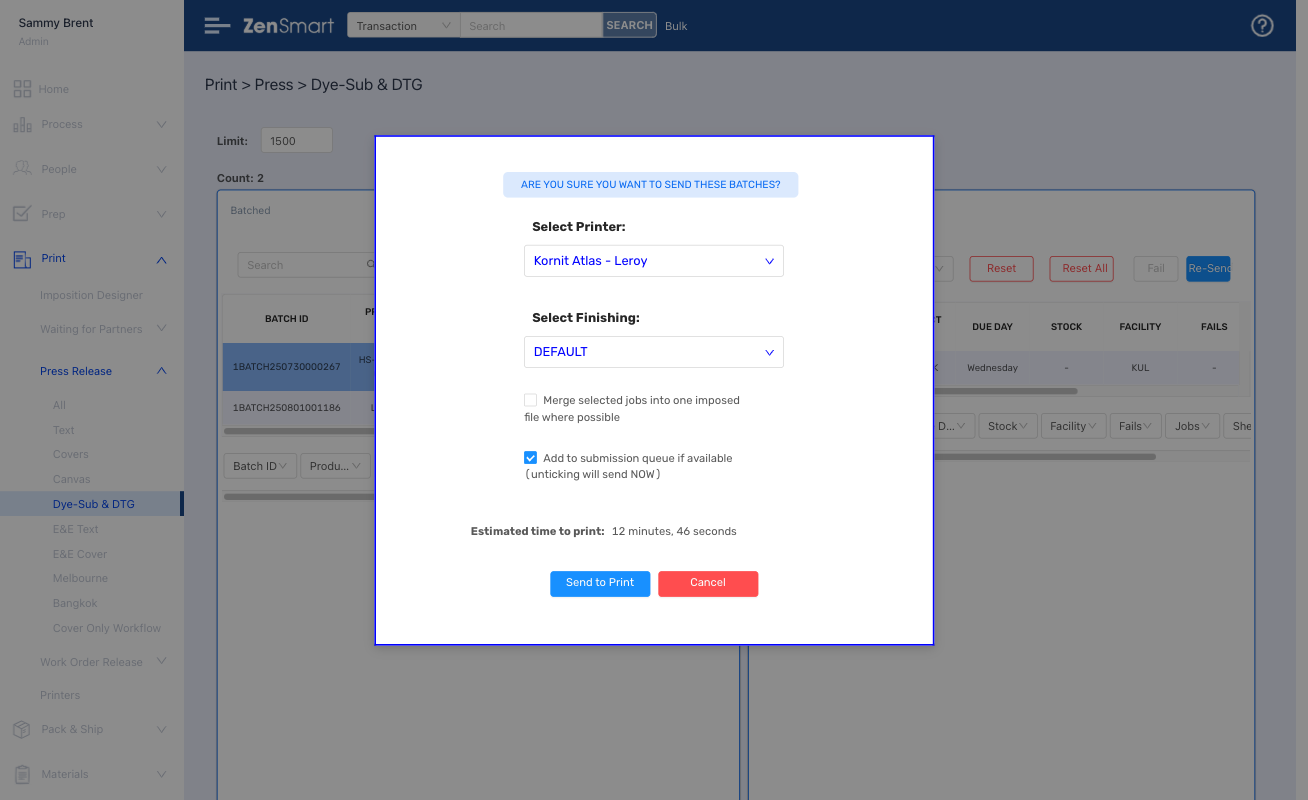
Features
- Create impositions for ech press and finishing combination
- Enables work to be moved from a cut sheet/manual guillotine to a web fed/automated cutter like Hunkeler or Tecnau with a click
- Dynamic insertion of job sheets
- Total control of job sheets
- Option to on-site locate the imposition server for very large job sizes to minimize file transfer latency
Which means
- Remove all pre-press cost
- Speed time to press
5
Make, Finish & Insert with total oversight of time, effort and cost
Features
- Staff at process stages barcode scan their work to get instructions and record their work
- Machines such as Pitney Bowes or similar Inserters can be dynamically called for real time process information
Which means
- Every page, every job is 100% visible at every stage
- No guessing, every job, every spoil is clearly instructed
- Staff and machine performance is fully tracked
- Drive down cost
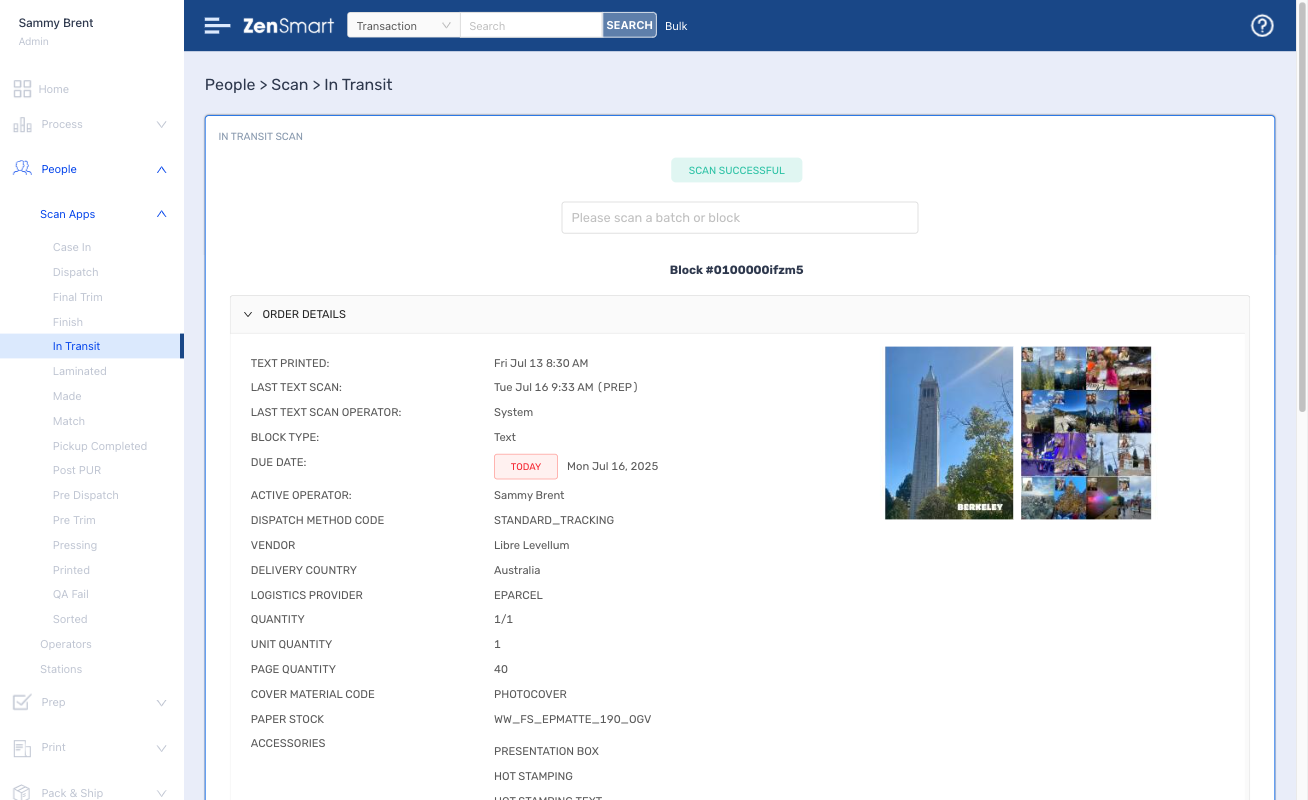

Perfect pick and pack with automated insertion instructions.
6

Features
- Barcode scan for on screen custom insertion instructions
- Scan validation on each insertion to ensure accuracy
- Track all actions at a fine level
Which means
- Cut custom pack costs
- Increase insertion accuracy
- Get powerful reporting on performance and productivity
7
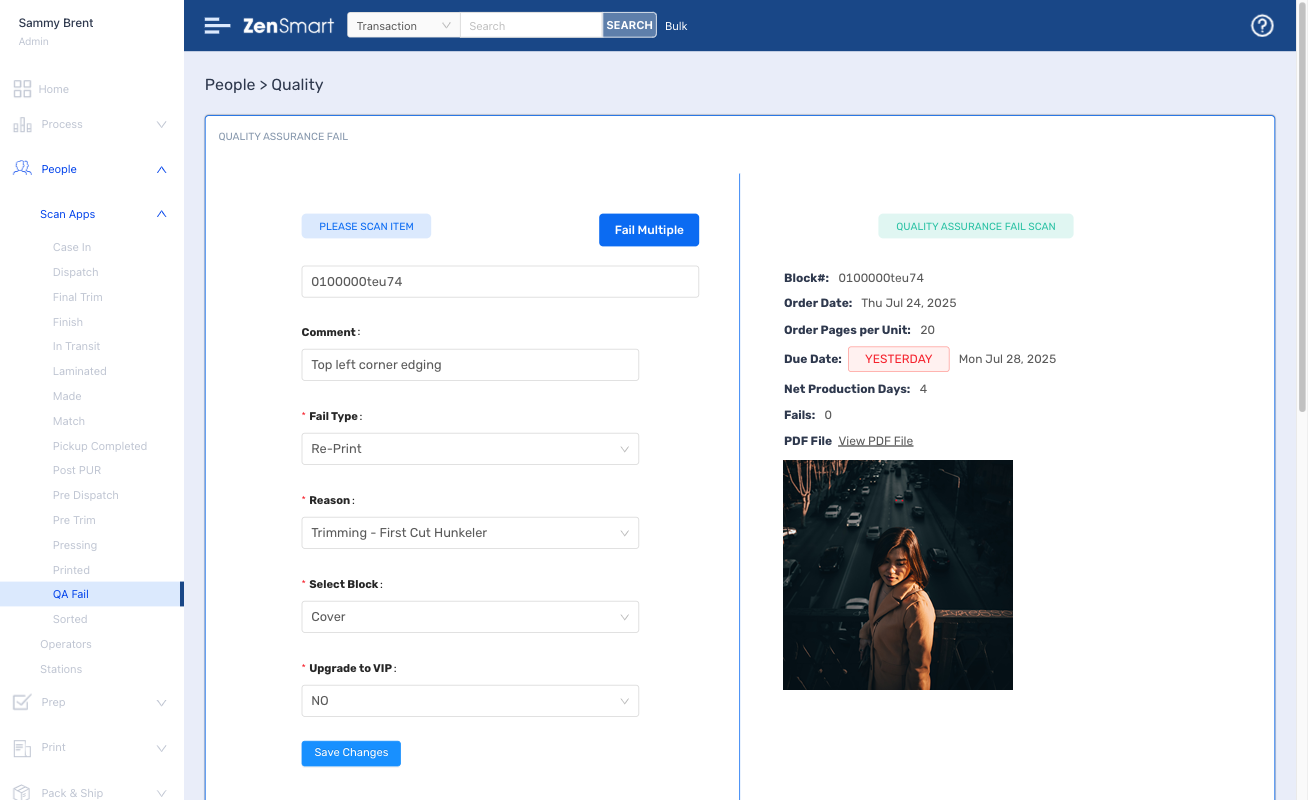
Eliminate spoils as an issue with automated reprint. Reprint (even at the individual page level) and route to dedicated fail printers in seconds
Features
- A simple barcode scan fails any defective item
- Failed items auto-batch according to your rules
- Machine and person responsibility for all fails are clearly visible
- Set budgetary limits for fails
Which means
- Identify trends and take corrective actions
- Ensure perfect lodgment
- Optimize press usage
Ship via your existing logistic integrations or ZenSmart's least cost smart algorithms with all the major carriers and platforms integrated
8
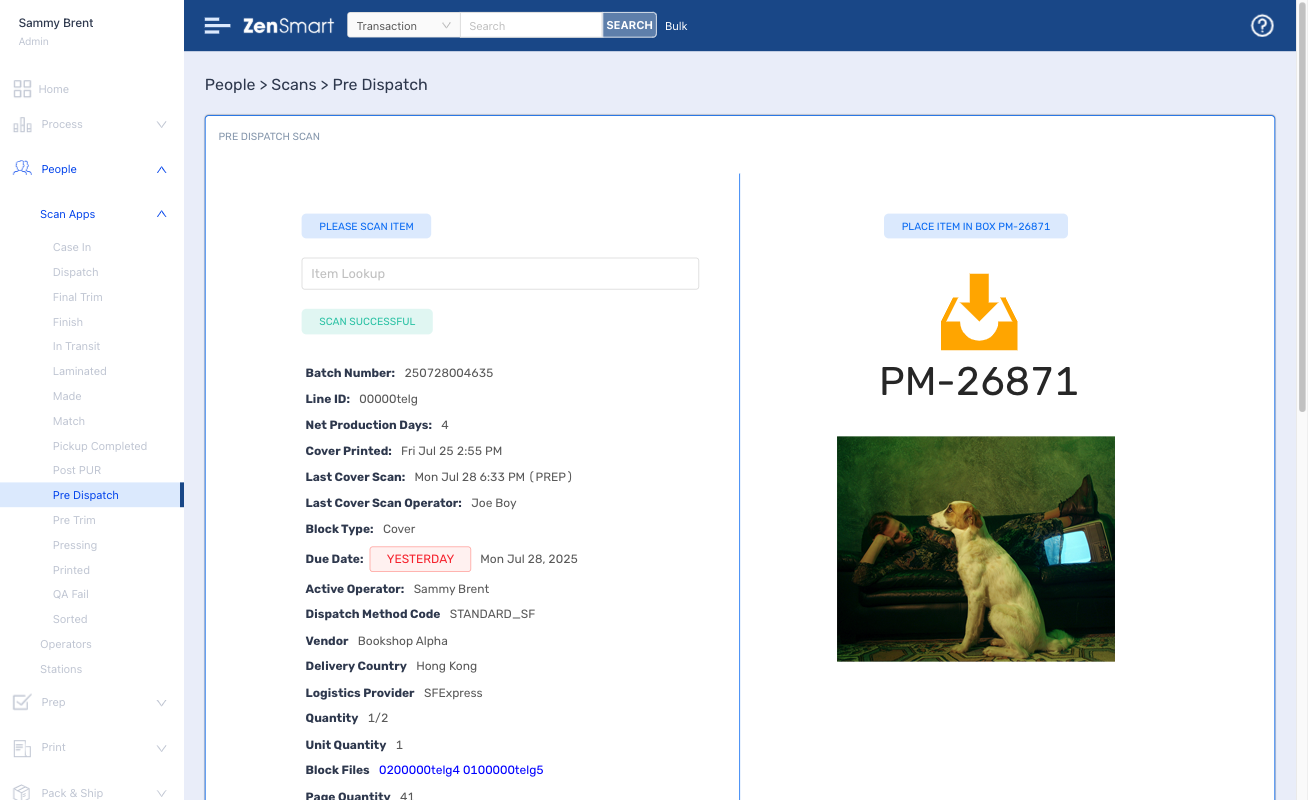
Features
- Big library of existing carrier integrations
- Least cost live auctions
- Pre-manifesting for super fast shipping
- Scan to ship – controlled by your automated ship rules
Which means
- Cut your shipping costs
- Ensure ship team productivity
- Clearly see status of orders by due date
Setup with ease, administer with minimal effort
Part of running a great workflow
automation platform is controlling how you
manufacture and how you adapt to changes
and innovation in your organization.
ZenSmart has a sophisticated set of tools
and easy to use interfaces to make
implementation easy and then adapt your
implementation over time.
AI-Start changes the game for system set up
Features
- Learns all your products, product meta-data from any of the existing order integrations (Netsuite, Shopify, PrintIQ, Cin7 and many more) or integrate your MIS/ERP using the ZenSmart pushAPI
- Adds all your job product workflow combinations with AI power automatically
- Enables super-fast addition of any new proprietary order source
Which means
- Automated rule based configuration for fast go-live
- Organizational flexibility and competitive advantage, take on jobs your competitors can’t

Use the pre-configured workflows or add new ones by drag and drop
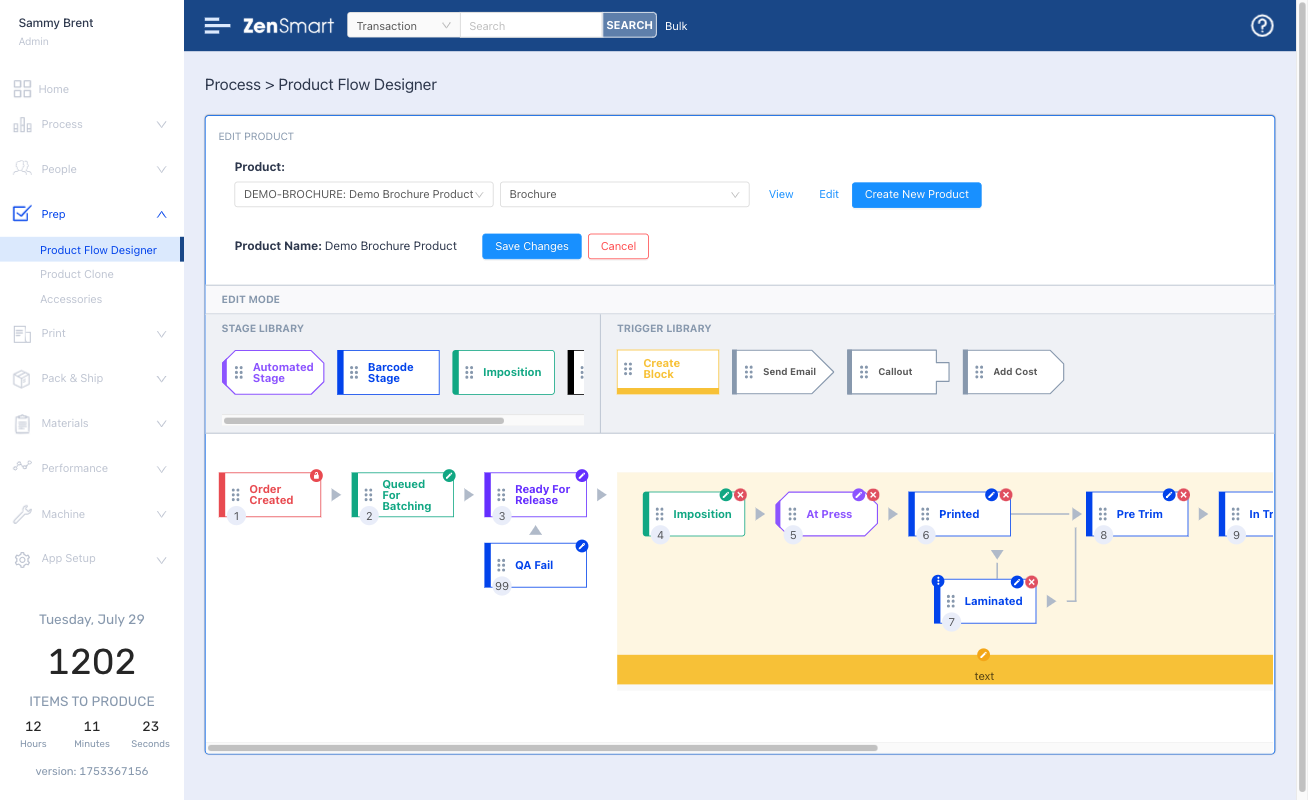
Features
- Create new product workflows with just a few clicks
- Amend workflows by simple drag and drop
- Sheet and web fed workflows pre-loaded together with wide ranging film and direct to object workflow
- Automatically queue and batch to different production workflows with your business rules
- Switch jobs from one print method to another with a single click
Which means
- Route work automatically
- Reduce labor costs
- Make changes to workflow with no headaches
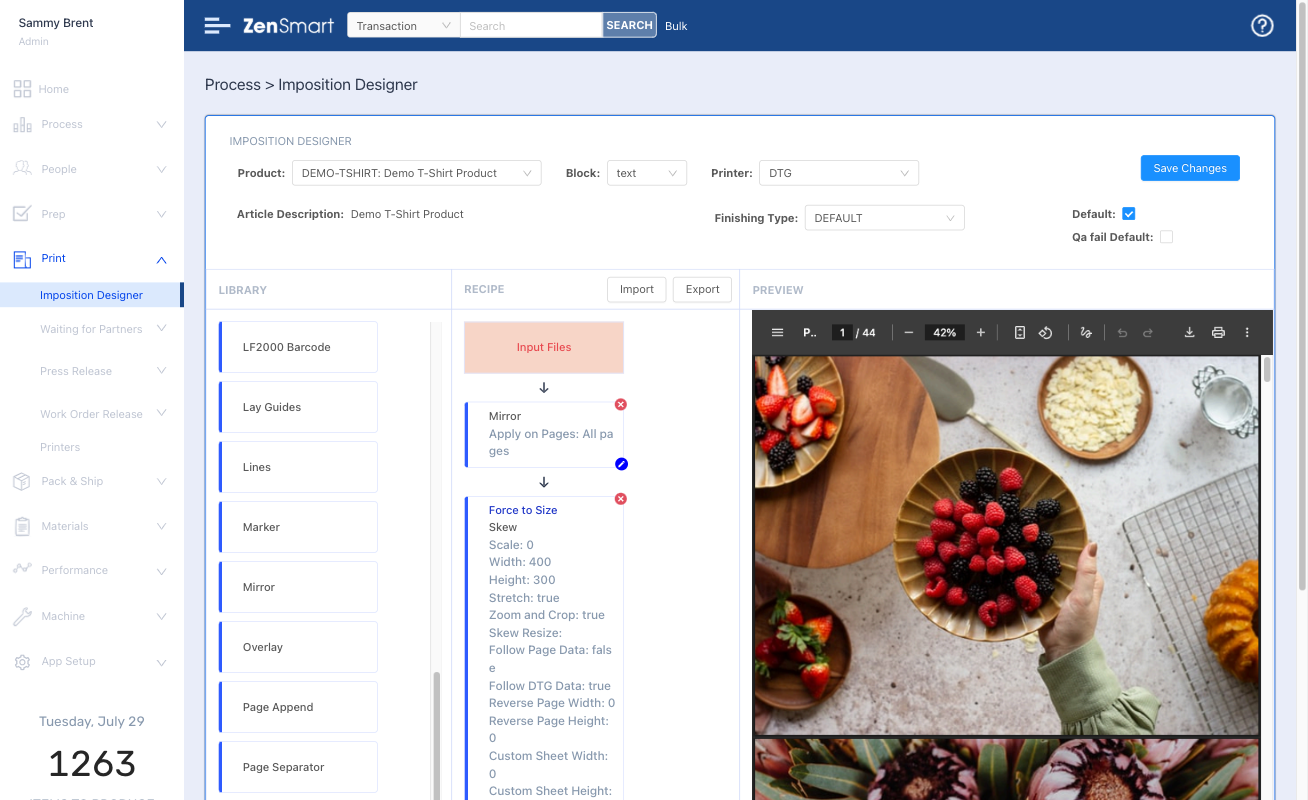
Fully integrated Imposition Designer enables any product-flow support
Features
- Design any page layout
- Build your recipes for each production type
- Auto generate batch and job sheets
Which means
- No need for an external imposition app
- Automate directly to web fed, sheet fed, wide format
- Just in time job switching to a different print-finishing workflow
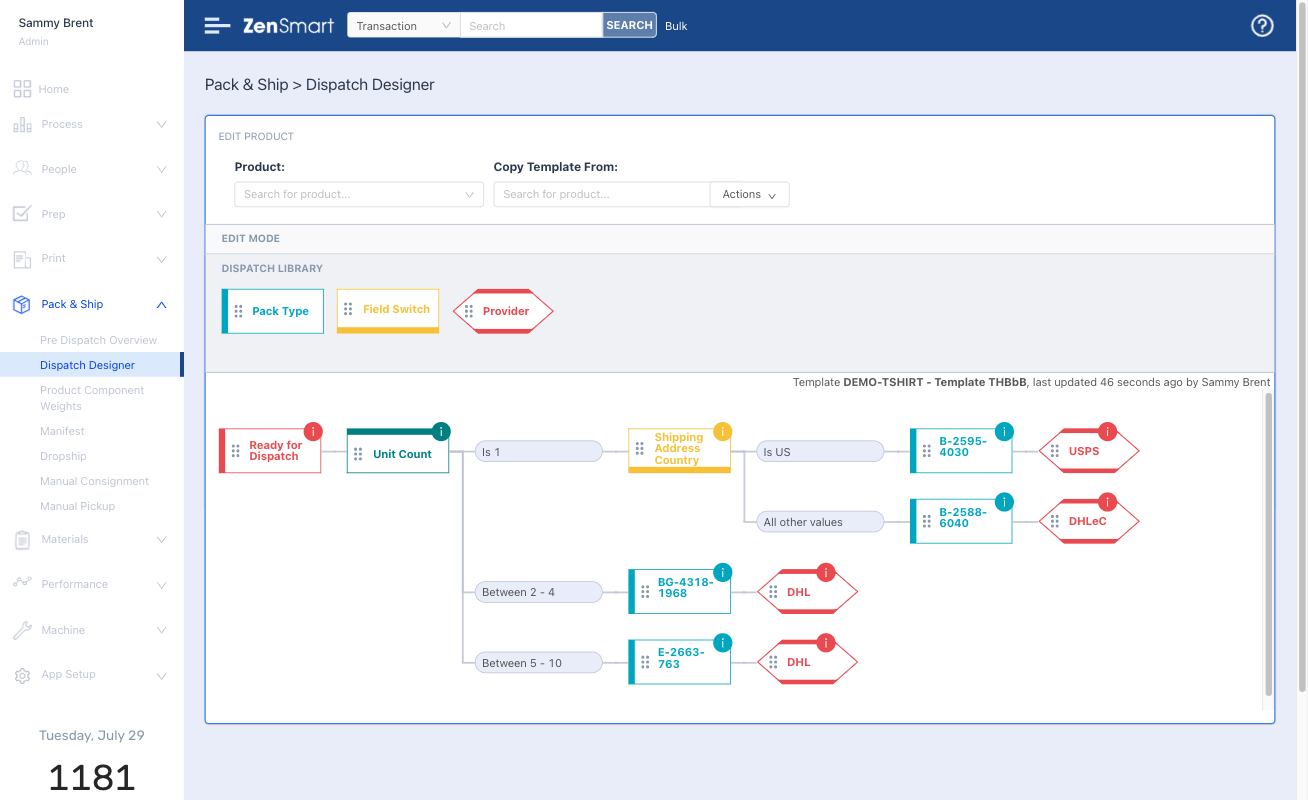
Least cost business rules are easy to define in Ship Designer or plug in your existing ship platform
Features
- Rich library of integrations with Fedex, UPS, Royal Mail, DPD, DHL, ShipStation, Shipcaddie and many more
- Run live reverse auctions to find least cost ship options
- Automated order inclusion reminders
- Automated change rules by date
Which means
- Cut your shipping costs
- Shipping becomes a 1-scan operation – no knowledge required just automated business rules followed
- Cut labor costs
- Onboard new staff fast
Every scan, every process creates data. Data that defines the who, what, where and when of manufacture.
It provides the foundation for incredible insight, insight to solve problems, insight to take your business to the next level, insight to drive profit
Sophisticated reporting provides deep insight
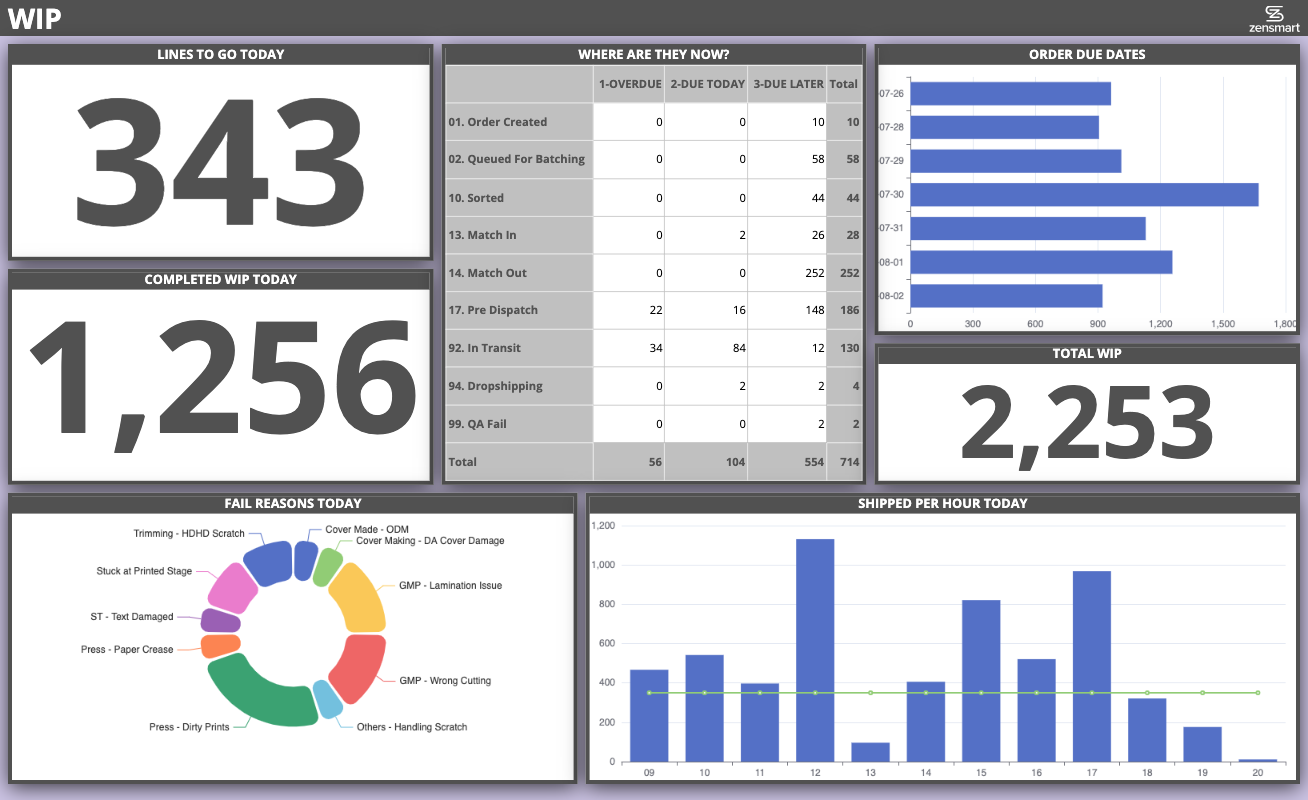
Take team performance to the next level through the power of information
Features
- Easy to modify – make relevant dashboards even for small teams in your business
- Optimized for cheap web-tv’s
- Automatically refresh – everyone gets the latest data
Which means
- Keeps everyone continuously informed
- Powerful impact on culture
- Enables management by walking around
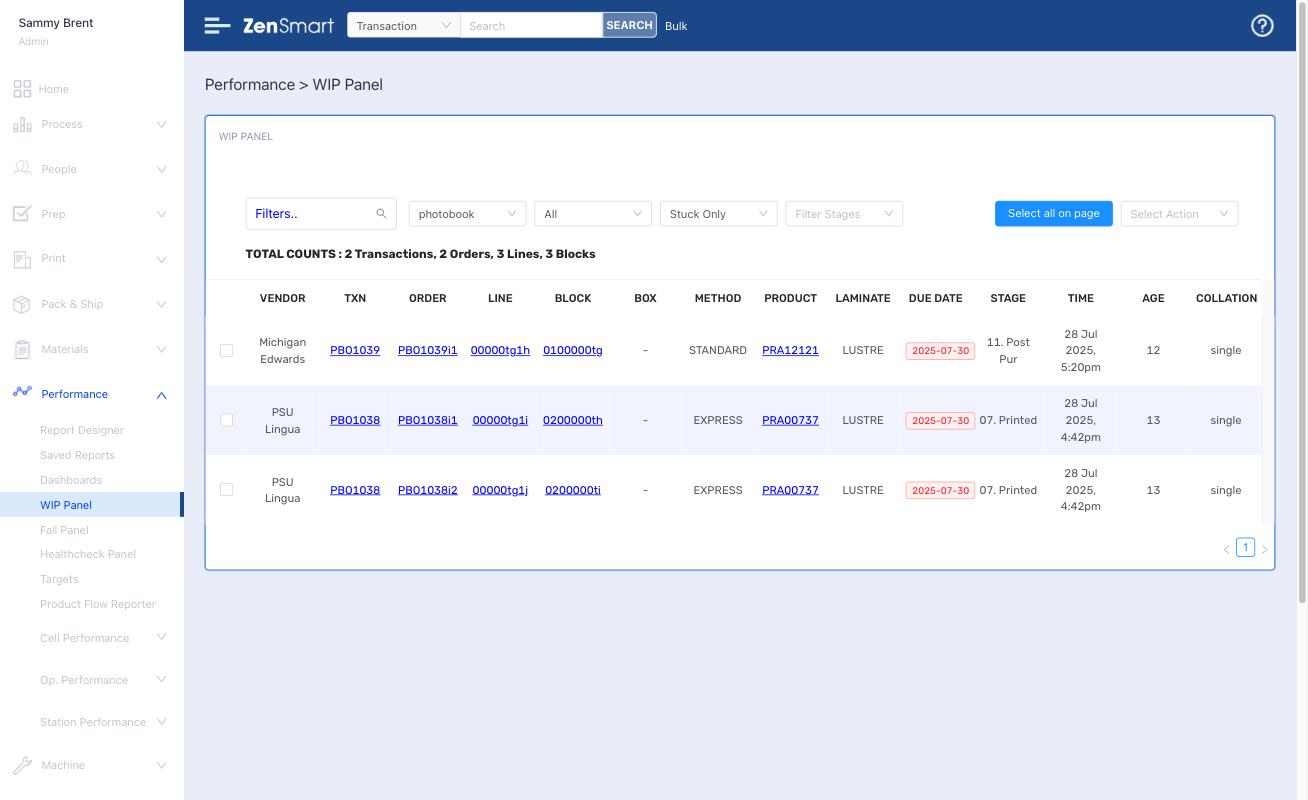
Tailored WIP and 'Stuck' views enable every order to be controlled
Features
- Powerful view of everything in production
- Filter for different products or attributes, instantly see what is overdue and due today
- Filter for items “stuck” taking too long at any workflow stage
Which means
- Total performance oversight
- Never let an item go over service level
- Cut your costs and keep your customers happier
- Outperform your competition
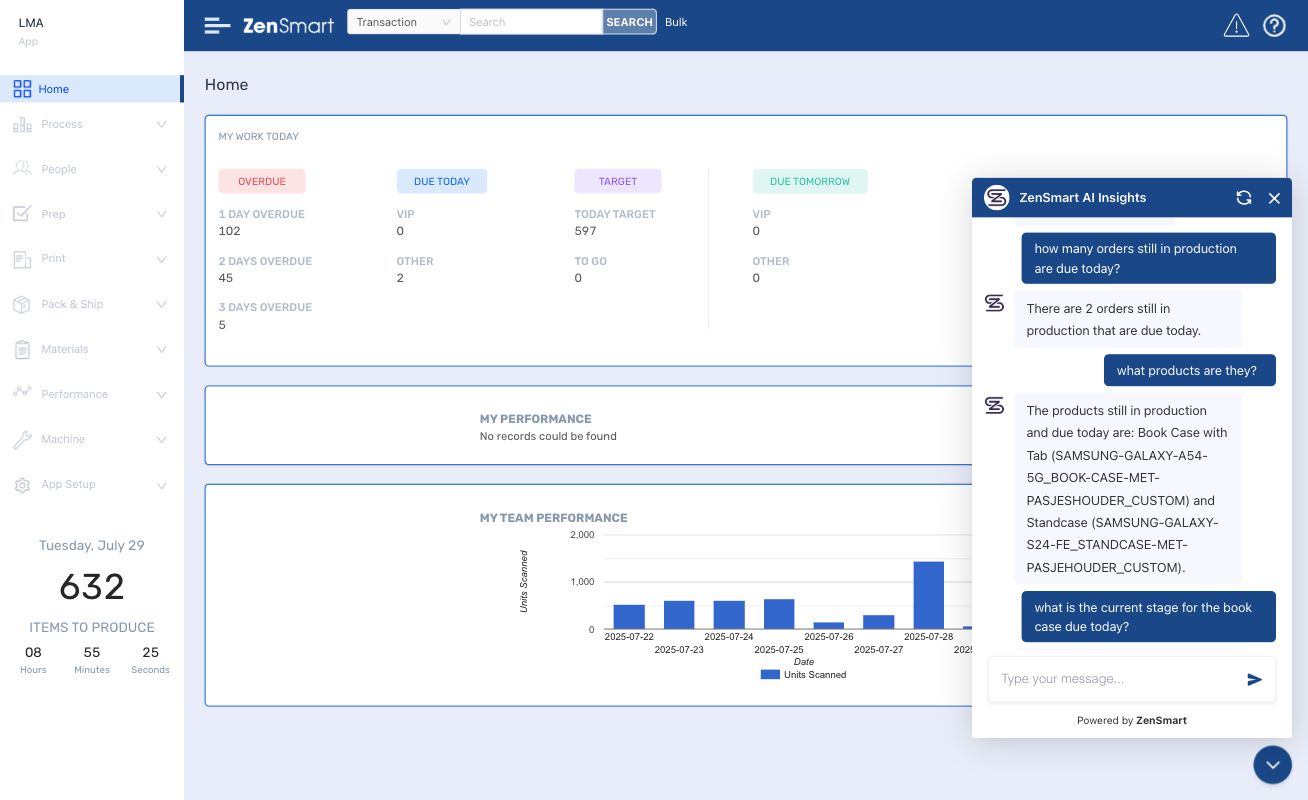
Have the answers at your finger tips with AI-Insight
Features
- AI powered chatbot
- Ask “any” question – questions about people, VIPs, SLA performance, machine downtime – anything at all even down to the individual page level
- Fully conversational
Which means
- Instant access to the info you have to know about
- Easy to use – don’t build a report – just ask a question
FAQ
How does ZenSmart ensure SLA compliance and failure recovery in high-volume direct mail operations?
What role does barcode-driven tracking play in ZenSmart’s direct mail automation?
How does ZenSmart identify and manage 'spoils' during the mail production workflow?
How does ZenSmart provide real-time visibility and reporting for mail insertion and lodgement?
ZenSmart in additon to batch, job or page level barcode scanning also supports reading in information from equipment such as inserters. For example, Pitney Bowes MRD files are directly upserted providing real time tracking of job progress and location of jobs in the facility.
How does ZenSmart handle a mix of letter and handline insertion and pick and pack work?
ZenSmart automates this through understanding what are the components that are attached against an order. When ZenSmart retrieves an order it processes the meta data of the order and stores all the components defined in that order. For example if a Job contains Orders comprising a VDP letter, membership card, lanyard and a standard brochure then ZenSmart will trigger the print of the VDP letter job and membership card. At handline insertion ZenSmart will manage the matching association of letter and card (if not automated upstream) and display instructions to the Team Member for other items to be added with optional barcode scan validation of those components of the Order.
Find out how ZenSmart can create a smart, flexible manufacturing automation outcome for your business with big reduction to your costs.... or just get some advice!
Let's Talk 🙂
Whether you’re just exploring automation, looking for advice, or ready to book a ZenSmart appointment – we’re always up for a chat. Reach out and let’s talk.