What’s new in ZenSmart this month
Sammy Brent, CIO • 20 April 2026 • 6 min read
We ship on two-weekly sprints — 22 new features in the last 8 weeks alone. Here are the four that will make the biggest difference to your factory floor, plus five fresh platform integrations that have landed this release.
Straight to a feature? Jump in below.
In this edition
01
AI Insights
Ask your production anything, in plain English
02
Production Alert Panel
Every production fault, surfaced the moment you log in
03
On Hold File Review
Clear artwork holds faster, without losing your place
04
Paperless Workflow
Full ZenSmart rigour. Zero paper.
05
Latest Integrations
BigCommerce · Printavo · Amazon · Pressero · Cin7 · Starshipit
At a Glance
The Problem
What’s the point of every production data point being at your fingertips if getting to the answer takes 20 minutes in a report builder?
ZenSmart’s reporting, dashboards and analysis tools are strong — but only if your team is confident picking the right fields and constructing the right query. Most aren’t, and most shouldn’t need to be. Production intelligence locked behind a report builder is production intelligence that doesn’t get used.
The answer to “which operator ran the most reprints yesterday?” shouldn’t take 20 minutes to find.
The Feature
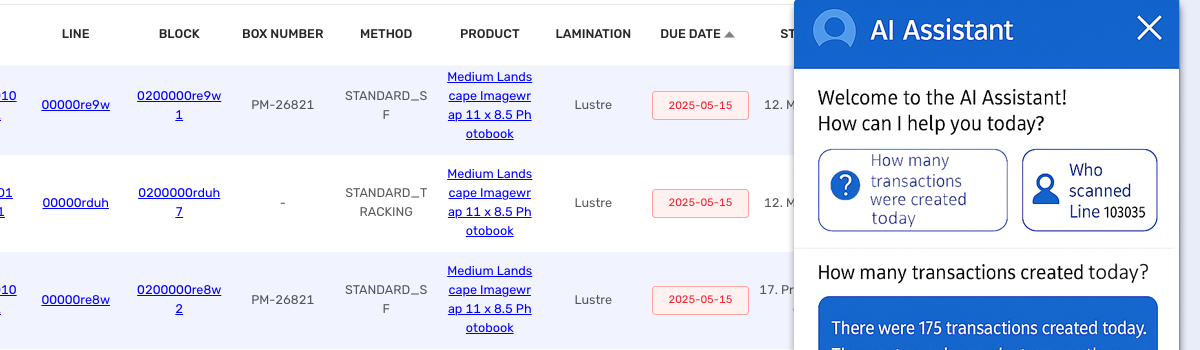
Easy access to any production information: ZenSmart AI Insights introduces chatbot-style access to any question you can think of about your production environment — the status of an individual order, a staff member’s performance, the current state of any workflow stage.
Type a question in plain English — or Spanish, French, German, and most major world languages — and get a live, accurate answer in seconds. No analyst. No report. No wait.
What it means
“What are today’s late orders?” “Which operator ran the most units yesterday?” “How many reprints did we log this week?” — every question your floor manager has on the way to the production floor now has an answer before they get there.

Every fault, surfaced the moment you log in
At a Glance
One persistent panel. Every failed transaction and critical system flag in one place — no screen-hopping, no custom reports, no waiting for someone to escalate.
The Problem
What’s the real cost of a broken transaction that no-one notices until a customer chases the order?
The more products, the more workflows, the more machines — the greater the complexity of production. Keeping total oversight over every element of files, systems, workflow, people, performance, and deadlines is genuinely hard.
Without a single place to see where production is stuck or broken, managers hunt across multiple screens, reports, and SQL alarms. By the time something surfaces, the delay has already compounded.
The Feature
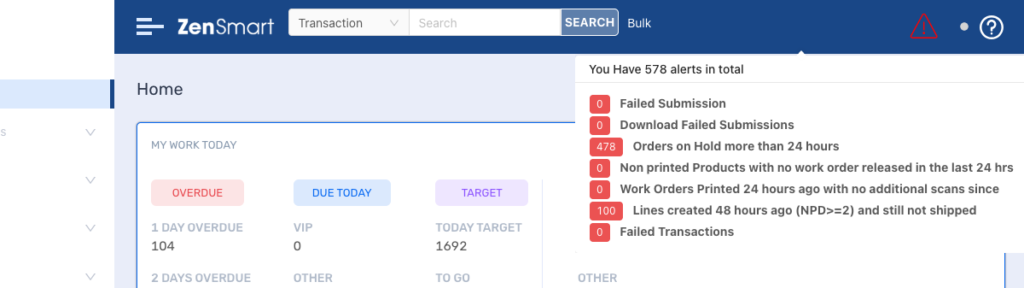
Keep on top of any production issues: The Production Alert Panel adds a persistent header icon that opens a real-time tabbed Alerts Panel the moment you log in. Failed transactions and critical system health flags are surfaced in red — immediately visible, no navigation required.
The panel is tabbed by alert type, so you can work through categories systematically rather than sorting through a single undifferentiated feed. And it can be configured to flag whatever you define as important.
What it means
A single place to know — the instant you open ZenSmart — whether the system is healthy. No more hunting. No more waiting for someone to notice something is wrong and send an email about it.
Clear artwork holds faster, without losing your place
At a Glance
Sequential discipline built into the interface. Work through held orders one at a time with clear action buttons — no modals, no dropdowns, no losing track of the job you’re on.
The Problem
How do you clear a growing queue of held orders without losing your place, double-handling jobs, or quietly avoiding the hard ones?
Customers change their minds, send corrupt artwork, forget to specify placement, or submit files that fail preflight. Each held order is a disruption to workflow and a cost the floor is carrying.
The bigger the volume of held orders, the harder it is to work through them systematically — without dedicated tooling, staff can lose their place, double-handle jobs, or skip harder cases.
The Feature
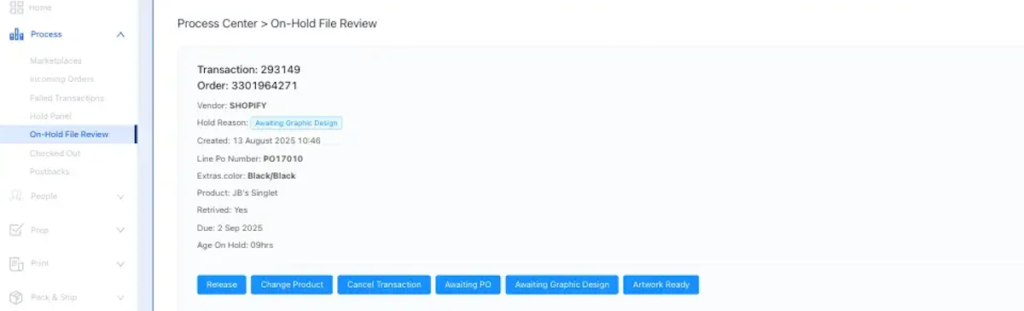
Streamline apparel pre-press workflows: On Hold File Review introduces a dedicated interface showing held orders, designed to be worked through one order at a time. Clear, dedicated action buttons handle each resolution path. No modals. No dropdowns. No losing track of which job you’re on.
The queue advances sequentially — the interface enforces the disciplined workflow the floor already needs, without relying on individual memory or habit.
What it means
Artwork holds move from scattered and ad hoc to structured and measurable. Orders with file issues are resolved and sent through to production faster — and the time spent per held order drops because the interface does the work of keeping you on track.
Full ZenSmart rigour. Zero paper.
At a Glance
Button-driven actions replace physical scanning across Fulfiller and Shipper views. VIP flags, partial quantities, consignments, and tracking all auto-linked. The manual spreadsheets for bulk corporate jobs are gone.
The Problem
How do you keep ZenSmart’s full unit-level rigour on the jobs where a barcode gun doesn’t fit the workflow?
Printed tickets and barcodes work for high-volume, uniform production. But for personalised gifting, promotional products, and curated fulfilment — where each item may differ — physical scanning introduces friction that doesn’t need to exist.
Bulk corporate jobs in particular often end up on spreadsheets outside ZenSmart, creating reconciliation work and breaking the audit trail.
The Feature
Make the transition to completely paperless factory workflow: Button-driven actions replace physical scanning — every button press generates the equivalent scan event behind the scenes, preserving ZenSmart’s complete audit trail and analytics without requiring a physical barcode.
The Fulfiller View batches by product across multiple orders. The Shipper View groups by recipient for dispatch. VIP order flagging, partial quantities, consignment generation, and automatic tracking linkback are all built in.
What it means
Full ZenSmart rigour — every unit tracked, every stage recorded, every cost captured — without a single piece of paper or a single barcode gun. The manual spreadsheets for bulk corporate jobs are gone.

Six new platform connections this release
ZenSmart connects to over 100 platforms — from order sources to ERP, inventory, machine management, and logistics. This release adds six more.






BigCommerce & Printavo
Automated order-to-production with no manual bridging. Orders land in ZenSmart the moment they’re placed.
Amazon
Reaches directly into personalisation inputs — names, photos, options — that standard Amazon backends cannot access. Personalised products from Amazon flow directly into production.
Pressero
Branded storefronts flow into production with full status postbacks. Customers see live order status through the Pressero storefront; production sees the job in ZenSmart.
Cin7 Core
Inventory to dispatch, fully connected. ZenSmart production events update Cin7 inventory in real time — no manual reconciliation between the two systems. Cin7 Core integration, joins the Cin7 Omni existing integration.
Starshipit
ANZ’s most widely used multi-carrier platform. Consignments and tracking numbers are auto-generated and linked back to the originating ZenSmart order — no copy-paste, no manual entry.
ZenSmart now connects to over 100 platforms. An active integration development program means new connections are added every release cycle. If you need a platform not yet on the list, reach out.
Questions About This Release?
Reach us directly at sales@zensmart.ai, or book a conversation via the form below.